
Pass the 24 Hour Refinancing Test for Real Estate Document Management
Turn file chaos into lender ready packs. Run the 24 hour refinancing readiness test, adopt property centric naming, and use AI OCR renaming to pass audits...

A real estate document management system is a transaction-aware platform that captures, classifies, and secures every closing, lease, and property record so it's searchable, auditable, and ready for a compliance check or refinance request within minutes, not days. The outcomes that matter are speed, defensibility, and control: any authorized person can find the right version of any document, prove who touched it and when, and hand over a full audit trail without a scramble. AI-driven OCR and extraction, paired with retention schedules and immutable audit logs, are what separate a real system from a folder full of PDFs.
TL;DR:
- Most teams fail the 24-hour refinancing-readiness test, highlighting a need for better document management and structured workflows.
- Effective systems automate document capture, extraction, classification, and retention, and log every access for compliance and audit readiness.
- Proper file organization scales with property-centric hierarchies and consistent naming conventions, ensuring quick retrieval and chronological sorting.
- Critical features include immutable archiving, role-based access, AI extraction with verification, and integration capabilities, not just storage.
- Off-the-shelf software is suitable for standard workflows, but custom solutions become necessary when advanced integrations or nonstandard processes are involved.
Table of Contents
- What Makes Real Estate Document Management Different From Cloud Storage?
- What Are the Core Benefits of a Real Estate Document Management System?
- What Features Should You Look for in a Document Management System?
- How Should You Organize and Name Real Estate Files?
- What Are the Most Common Document Management Workflows in Real Estate?
- How Do You Choose and Roll Out a Document Management Solution?
- When Should You Buy Off-the-Shelf vs. Build a Custom System?
- What Should You Do Next?
- Why the Refinancing Test Matters More Than Any Feature List
- Sources
What Makes Real Estate Document Management Different From Cloud Storage?
Dropbox and Google Drive store files. A document management system manages them through a full lifecycle: capture, extraction, classification, linking to a specific property or matter, and retention. That distinction sounds academic until a lender asks for the original title deed and three amendments by Friday, and someone has to figure out which of four folders named "Docs Final" actually holds them.
Treating storage and management as interchangeable is one of the more common mistakes in the industry, because management demands active handling at every step, not passive dumping.
A working system typically does the following:
- Captures documents from scans, email, or upload and monitors intake folders automatically
- Runs OCR and AI extraction to pull property address, parties, and dates the moment a file lands
- Applies naming conventions and files the document under the correct property or transaction automatically
- Logs every view, edit, and download for audit purposes
- Applies a retention schedule based on document type
A plain cloud drive does none of this on its own. It's a filing cabinet, not a file clerk.
What Are the Core Benefits of a Real Estate Document Management System?
The biggest practical win is speed under pressure. Closing packets, refinance requests, and audit pulls all hinge on how fast you can produce the right documents, and a well-structured system turns a half-day scavenger hunt into a five-minute export.
Four benefits show up repeatedly once a team moves off shared drives:
- Faster packet assembly for closings, refinances, and lender requests
- Lower compliance and litigation exposure, since immutable archives and audit trails can defend transaction history in disputes
- Smoother handovers between agents, transaction coordinators, and property managers
- Better reporting, since clean metadata means portfolio-level data is actually queryable
Pro Tip: Run the refinancing-readiness test on your current setup: ask yourself whether your team could produce a lender's core document list within 24 hours. If the honest answer is "maybe," you're storing documents, not managing them.
That 24-hour benchmark is worth sitting with. It's not a compliance requirement, it's an operational stress test, and most teams fail it the first time they actually try it.
What Features Should You Look for in a Document Management System?
Feature lists in vendor pitches tend to blur together, so it helps to sort them by what they actually protect against.
- Capture and monitoring: automated intake from email, scanners, and mobile upload, not just manual drag-and-drop
- OCR and AI extraction: pulls property address, party names, and dates automatically, but only matters if paired with a verification workflow. Accuracy without a review log that shows who corrected which field actually weakens your compliance position, because you can't prove the data was checked.
- E-signature integration: signed documents should carry their own provenance chain, tying signature events back to the exact document version
- Immutable archive and retention schedules: WORM-like storage that can't be altered after the fact, with retention periods set per document type
- Search and metadata: property-linked tagging, matter numbers, and full-text search across scanned files
- Access controls and logging: role-based permissions with a record of every access event
- Integrations and APIs: connections to your CRM, accounting software, or transaction platform
Pro Tip: Ask any vendor to show you the edit log on an OCR-extracted field, not just the extracted result. If they can't produce one, the extraction has no verification trail behind it.
How Should You Organize and Name Real Estate Files?
Folder-by-document-type structures work fine for ten files. They collapse at a hundred properties, because the same lease renewal ends up scattered across a dozen inconsistent locations.
A hierarchy that scales looks like this:
- Portfolio (top level, if you manage multiple ownership groups)
- Property (address or property ID)
- Unit (for multi-unit buildings)
- Transaction or tenant (specific deal, lease, or tenancy)
- Documents (the actual files, named consistently)
A property-centric structure like this outperforms folder-by-type approaches once you're managing more than a handful of properties, because everything relevant to one address lives in one place instead of being spread across "Leases," "Inspections," and "Correspondence" folders.
For naming, put the date first, then the property identifier, then the document type, then version: 2026-03-14_123MainSt_Lease_v2.pdf. This sorts chronologically and by property automatically, without anyone having to think about it.
Legacy archives full of files named "scan001.pdf" don't need to be renamed by hand. AI-powered batch renaming can extract the property address, parties, and dates from each file and rebuild the filename automatically, which is usually the fastest way to make an old shared drive searchable again. Tag retention periods at the point of upload, since retroactively figuring out what to keep and what to purge is far more painful than setting the rule once.
What Are the Most Common Document Management Workflows in Real Estate?
Different workflows put pressure on different features, which is worth knowing before you shop for a system that's strong in the wrong place.
- Closings: speed and completeness matter most. You need every disclosure, inspection report, and signed addendum assembled into one packet on demand.
- Lease lifecycle: amendments and renewals need version history so nobody signs against an outdated lease term.
- Property management: maintenance records and warranty documents need to link to the specific unit, not just the building, so a five-year-old HVAC warranty doesn't get buried under unrelated paperwork.
- Refinance and audits: this is where the 24 hour test bites. Lenders and auditors want a timeline of documents, not just the documents themselves.
How Do You Choose and Roll Out a Document Management Solution?
Start with the must-haves, not the nice-to-haves. A system that can't produce an audit trail or enforce retention automatically isn't a real contender, no matter how polished its interface looks.
- Set minimum criteria: immutable archiving, configurable retention, role-based access logging, and OCR with a verification step
- Ask vendors direct questions about where data is stored, how encryption works in transit and at rest, what retention periods are configurable, and how easy it is to export everything if you leave
- Watch for red flags: no audit trail, no export path, vague answers on data ownership, or extraction with no way to see who reviewed the results
- Pilot on one property or one office before a full rollout
- Map your legacy archive and run batch renaming on it rather than starting a parallel clean system
- Train the team on naming conventions, since enforcement is what keeps a system from reverting to ad-hoc folders within a few months
- Review after 90 days against the refinancing-readiness test
Pro Tip: Before signing anything, ask the vendor how they handle encryption and data ownership in plain language. Clear answers on storage location, encryption, and export rights should be table stakes, not a sales differentiator.
When Should You Buy Off-the-Shelf vs. Build a Custom System?
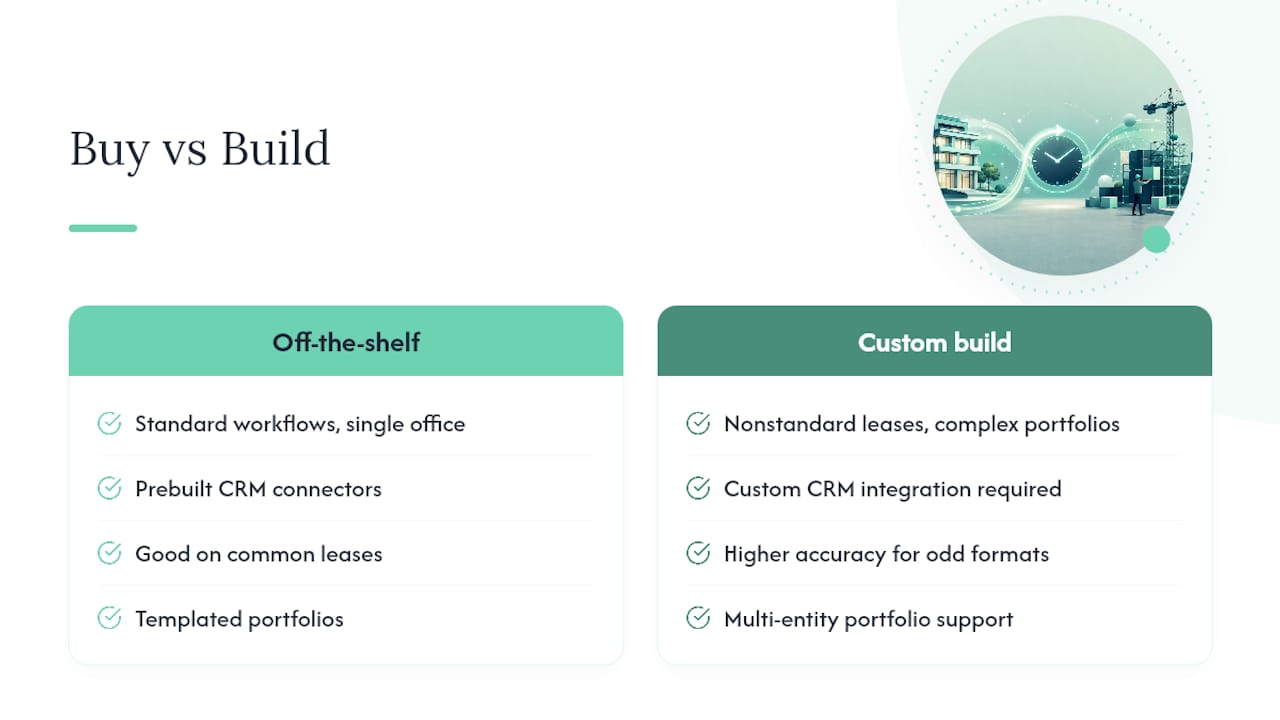
Off-the-shelf document management software works well when your workflows are standard: single-office transactions, straightforward leases, common retention rules. Most agencies fit that description and shouldn't overspend on custom development.
The calculation changes when off-the-shelf tools can't connect cleanly to your CRM, your extraction accuracy keeps failing on nonstandard lease formats, or you manage a portfolio structure no template anticipated. That's where a bespoke build earns its cost.
Logicbranch builds AI-native capture, extraction, verification, and integration workflows for teams in exactly that position, including e-signature and document workflows through its ksign.co product line. Advanced provenance options like blockchain-anchored signing events exist for teams that need them, though most real estate operations don't require that level of infrastructure to meet audit standards. Budget for data cleanup up front. Migrating a messy legacy archive almost always costs more time than the new system itself.
What Should You Do Next?
The verdict is simple: a real estate document management system pays for itself the first time a lender, auditor, or buyer's attorney asks for something on short notice and you actually have it. Run the 24 hour refinancing-readiness test on your current setup this week. Pilot AI-assisted renaming on one small legacy folder before touching your full archive. Then shortlist off-the-shelf platforms or scope a custom build with Logicbranch based on what that pilot reveals.
Why the Refinancing Test Matters More Than Any Feature List
The industry talks about document management in terms of features: search, OCR accuracy, storage limits. That framing misses the point. The real question is whether your system holds up under pressure, and the only honest way to answer that is the refinancing-readiness test. If you can't produce a lender's core document list in 24 hours, no amount of "AI-powered" marketing language fixes the underlying problem.
Where conventional advice falls short is treating naming conventions as a one-time setup task. They aren't. Without enforcement and automated repair, teams revert to ad-hoc filenames within months, which is exactly why AI-assisted batch renaming matters more for legacy cleanup than for new files going forward. New files can follow a template from day one. Old ones need a tool to fix them retroactively.
My honest read: most agencies overinvest in searching for the "best" software and underinvest in the boring work of mapping their existing archive first. Fix the structure, enforce it, and most off-the-shelf tools will serve you fine. Only build custom when your extraction accuracy or integrations genuinely can't keep up.
— Josh
Sources
Retention rules vary by document type and jurisdiction, and Australian record-keeping guidance is a useful starting point for confirming how long deeds, titles, and transaction files need to be kept. For naming and folder structure specifics, DoorVault's guide to organizing rental property documents and Renamer.ai's breakdown of AI-assisted renaming both go deeper into the mechanics covered above.

API-First Design: What It Is and How to Apply It
API-first design means agreeing the API contract before building anything. See how it works, when it beats code-first, and how Australian businesses can use it.

Tokenization vs Encryption: How to Choose for Your Data
Tokenization and encryption protect data in different ways. Learn how each works, how they compare with masking and hashing, and which fits your Australian business.